
La Marzocco · Modbar
Your bar,your way.
Modbar puts slim espresso, steam and pour-over taps on the counter and hides the machinery underneath. Nothing stands between your baristas and your customers.
Build your bar
Taps on top. Everything else underneath.
Each system is a tap on the counter linked to its own module below. Pick an example to see how the pieces fit together.
Illustrative layoutNot a technical installation drawing. We confirm positions and services with you before installation.
Espresso bar
One espresso tap and one steam tap: the classic café pairing, each on its own module.
- 1 Espresso AV module, 1 espresso tap
- 1 Steam module, 1 steam tap
- A drip tray under every tap
Higher-volume bar
A second tap on each module gives two baristas their own station, still with two modules underneath.
- 1 Espresso AV module, 2 espresso taps
- 1 Steam module, 2 steam taps
- A drip tray under every tap
Full coffee bar
Add Pour-Over 2.0 for filter coffee brewed to recipe. It brings its own module.
- 1 Espresso AV module, 1 espresso tap
- 1 Steam module, 1 steam tap
- 1 Pour-Over module, 1 pour-over tap
- A drip tray under every tap
Three systems
Choose what your menu needs.
-
 1–2 taps per module
Espresso AV
Consistent, volumetric espresso from a tap that faces your customers.
See Espresso AV: Espresso AV -
 1–2 taps per module
 -
 2 taps, or tap + faucet
Pour-Over 2.0
Filter coffee brewed to the same recipe every time, without a kettle.
See Pour-Over: Pour-Over 2.0


Grow with your trade
Start here. Add to it.
Open with the systems you need today. As trade grows, add a tap to a module that has room, or add a new system with its own module.
-
Start here
One espresso tap
An Espresso AV module and its tap. Everything else can follow.
-
+ Tap · same module
Add a second espresso tap
It connects to the Espresso AV module you already have. No new module.
-
+ System · new module
Add Steam
Steam is a separate system, so it brings its own module.
-
+ System · new module
Add Pour-Over
Pour-Over 2.0 adds filter coffee, with a third module underneath.
Already have Modbar?
Upgrade the bar you already run. We check compatibility before fitting.
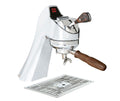 Espresso AV extra tapA second tap for an Espresso AV module
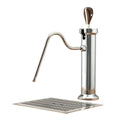 Steam extra tapA second tap for a Steam module
- ABR scale and drip-tray kitOne per Espresso AV tap
Installation
What goes under the counter.
Modbar needs more planning than a countertop machine. These are the things we check with you before installation.
-
Cabinet space and ventilation
Each module sits in the cabinet under its taps and needs space around it for air to circulate.
-
Electrical supply
Each module needs its own dedicated supply. We confirm the right connection for your site before installation.
-
Water and drainage
Each module needs a cold-water feed and a gravity drain inside the cabinet. We specify water treatment for your water.
-
Tap-to-module position
Every tap needs a hole through the counter and must sit within 1.5 m of its module, so taps and modules are planned together.

Let's design your bar.
We check your site, specify the setup, then install, commission and service it.